

BeginnerLesson 6 of 65 min
Work with a file or a photo
Goal: Turn a photo of a receipt or list into a neat table.
Do it in 3 steps.
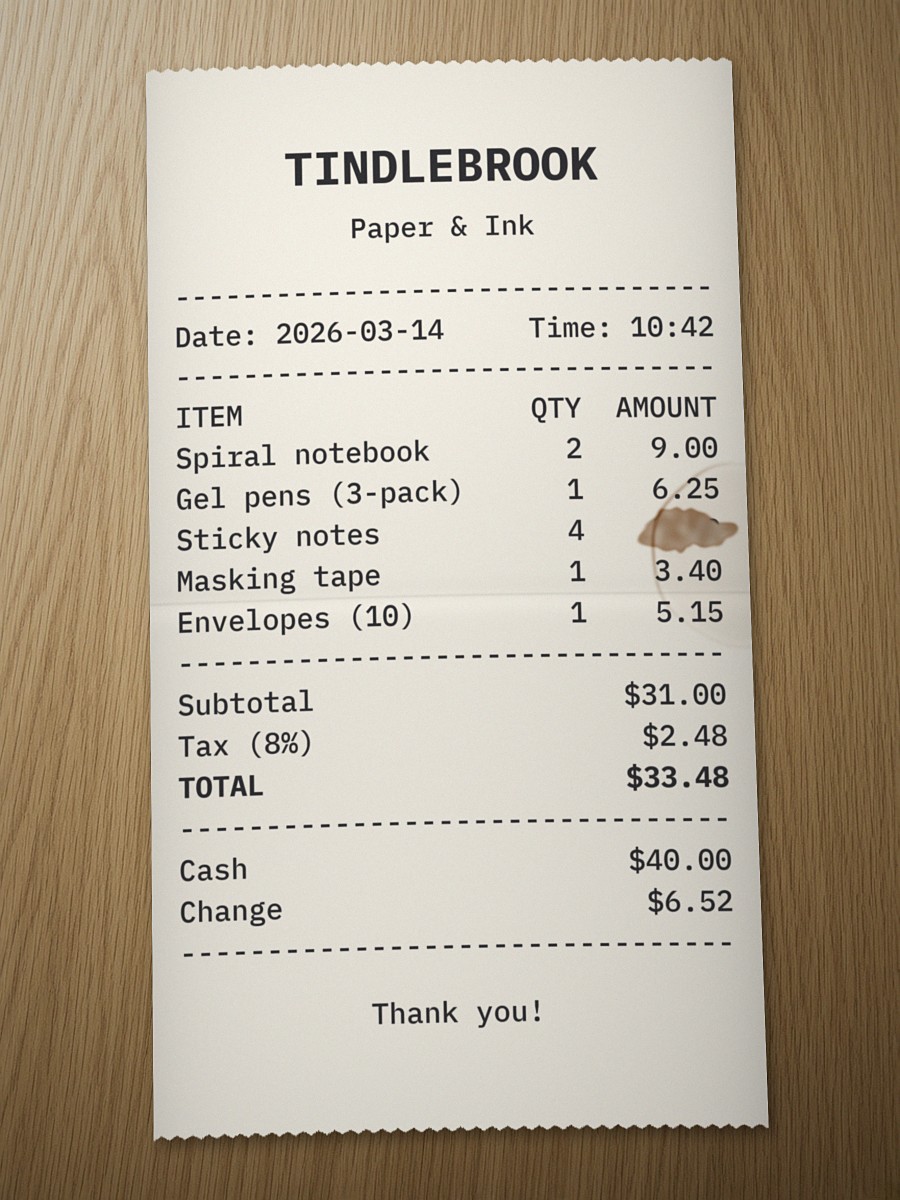
- Tap the button below, or use your own photo.Download the practice receipt
- In your AI chat, tap + or the paper clip and attach the photo. No + button? Try another app from Lesson 1.
- Copy this prompt, fill in the columns you want and send it with the photo.
Read only the photo I attached. Make a table with these columns: [write your columns here]. Copy every name and number exactly as shown. If you can’t read something, write "Can’t read" instead of guessing.
No card numbers, addresses or health details in your photo.
What good looks like
Example
Part of the practice receipt as a table
| Item | Qty | Amount |
|---|---|---|
| Spiral notebook | 2 | 9.00 |
| Sticky notes | 4 | Can’t read |
| Masking tape | 1 | 3.40 |
A stain hides one amount, so “Can’t read” is right.
Quick check
0 of 3 checked
Get new lessons by email as they open.
We'll email you a link to confirm. Unsubscribe any time. Privacy policy
You may also get occasional Automate Your Hours updates.